Had about enough of your pellet grill’s temperature swings? Before you give up on the whole grill, it might be worth taking a closer look at its brain.
My Traeger Pro 22 has perfectly usable cooking hardware, but its original controller belongs to an older generation of pellet grill technology. I wanted to find out whether replacing that controller could fix the overshooting, slow recovery, and erratic temperatures while adding the conveniences we expect from a modern smoker.
So I installed a prototype FireBoard Drive Pellet Controller, loaded the hopper, and put a pork shoulder on for a proper test. The short answer? This little heart transplant made a big difference.
Disclosure: FireBoard provided the prototype for this sponsored test ahead of launch. Final pricing and product details were not available at the time of testing.
Table of Contents
- Key Takeaways
- Why Upgrade the Controller Instead of the Whole Grill?
- Installation Was Almost Too Easy
- The Test Cook: A Simple Pork Shoulder
- Wireless Probe Integration Without the Fuss
- Drive Programs: Start Low, Then Raise the Heat Automatically
- Did the PID Controller Actually Fix the Temperature Swings?
- A Few Useful Extras, and a Very Good Dinner
- My Verdict: Don’t Bin the Grill Just Yet
Key Takeaways
- The prototype FireBoard controller improved temperature stability and recovery on my Traeger Pro 22.
- Installation used four color-matched connectors and an optional magnetic mounting kit.
- Drive Programs automatically change cooking temperatures based on elapsed time or temperature.
- Final pricing was unavailable, so the upgrade’s overall value remained an open question.
Why Upgrade the Controller Instead of the Whole Grill?
There is a substantial price gap between an older, simpler pellet grill and a premium model with modern controls. The comparison I used put a Traeger Pro 22 at $449 USD against a Timberline at $3,499 USD. Those were the prices shown for this test, not a promise of current pricing.
Of course, a premium grill includes more than a smarter controller. But if your main frustrations are temperature control and missing connected features, replacing the entire cooker is a pretty expensive way to address them.
My question was whether a controller upgrade could deliver the improvements that mattered most:
- More stable temperatures without the big spikes and dips.
- Better recovery after opening the lid or increasing the setpoint.
- Wi-Fi and smart app control rather than relying entirely on the front panel.
- More temperature probes, including wireless integration.
- Automatic cooking programs that change temperatures without another trip outside.
That is a much more useful test than simply asking whether the new screen looks nicer.
Installation Was Almost Too Easy
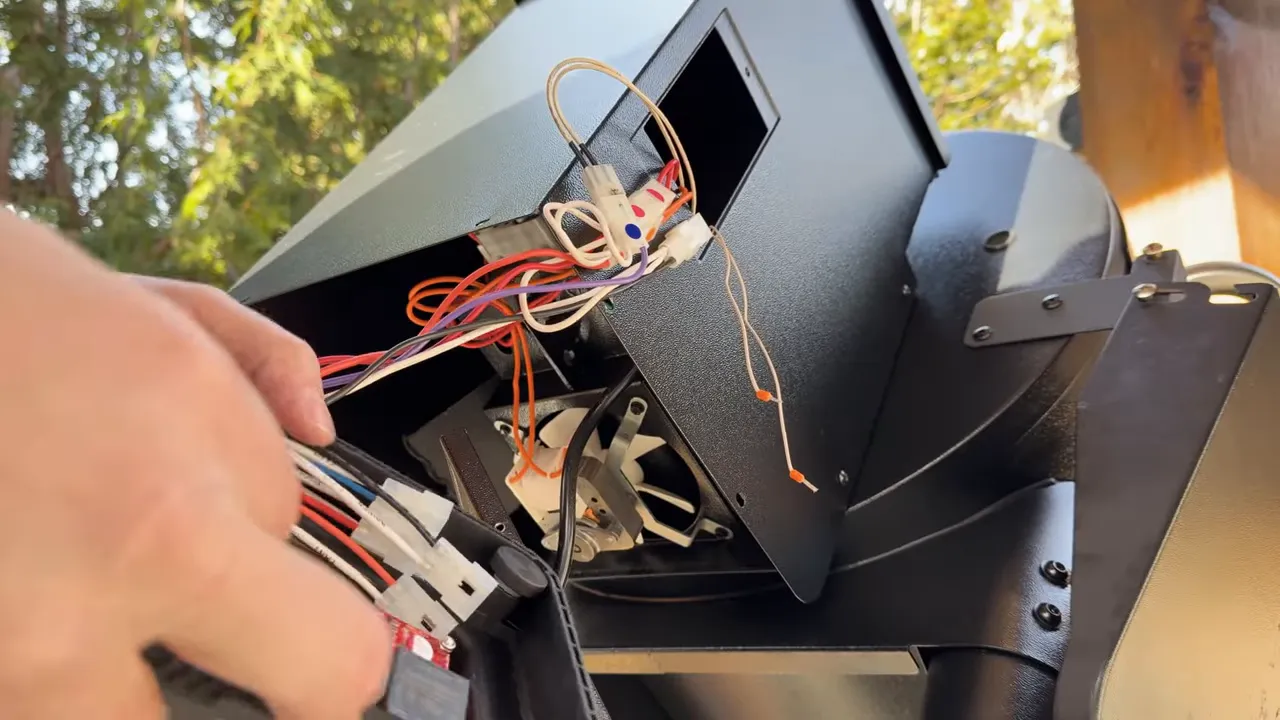
I’m not going to lie: the installation fell into the category of almost too easy. While recovering from knee surgery, getting down to reach the wiring was the most difficult part for me.
On my Pro 22, the swap came down to a few straightforward steps. This describes my prototype installation, so use the applicable installation instructions and disconnect power before working on your own grill.
- Remove the original faceplate to access the controller and wiring.
- Release the factory zip ties as needed to access the connectors.
- Unplug the four color-coded connectors from the original controller.
- Match those connectors to the corresponding colors on the FireBoard unit.
- Mount the new controller in place.
I had the optional magnetic installation kit, which included a weatherproof seal around the outside. That meant no drilling into the hopper housing. I lined up the controller, seated it against the opening, and the magnets held it in place with the weatherstripping around the perimeter.
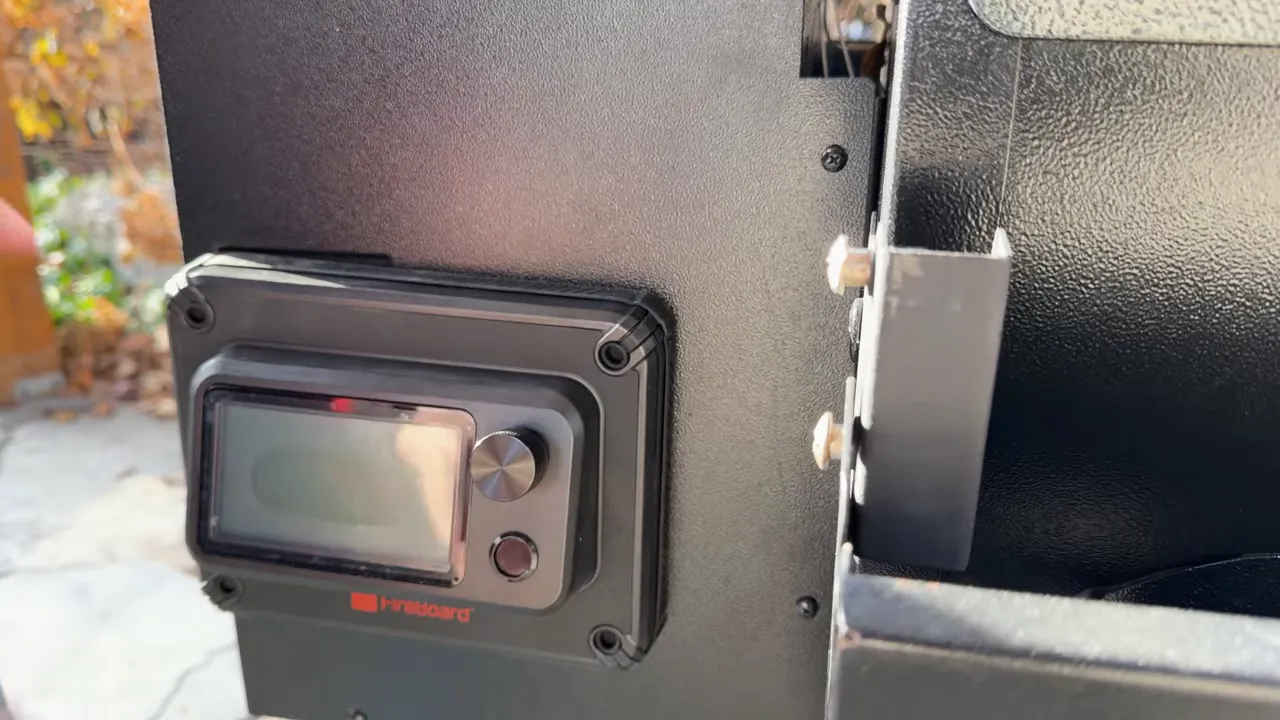
Once I connected power, everything was recognized immediately. I added pellets, started the grill, and it was up to temperature sooner than I had planned for.
Fortunately, there was a pork shoulder in the refrigerator for just such an occasion.
The Test Cook: A Simple Pork Shoulder
The point here was to test the controller, not complicate dinner. I kept the pork preparation simple with two store-bought rubs:
- A savory base layer with some depth and enough salt to bring out the pork’s flavor.
- A habanero honey seasoning for sweetness and a little kick.
Use whichever rubs you enjoy. The useful idea is the combination of savory with sweet and spicy, not a requirement to track down these exact seasonings.
I tied the shoulder with butcher’s twine to help it hold its shape, touched up the seasoning, and gave it about an hour before it went onto the pit. By then, the salt had started drawing moisture to the surface and the rub was adhering nicely.
With good-quality pellets in the hopper and the cooker set to 200°F, it was time to test the two features I was particularly excited about: Pulse integration and Drive Programs.
Wireless Probe Integration Without the Fuss
I already liked FireBoard’s controls from my earlier kamado fan-controller testing. Programs and integration were a big part of why the FireBoard Drive had become my go-to choice, and they were exactly what I wanted to try on this pellet grill.
The first piece was the FireBoard Pulse wireless probe. In this setup, taking the Pulse out of its charger brought its readings onto the controller almost immediately, without an additional setup step during the demonstration.
I could see both the probe’s internal meat temperature and its external ambient reading. Using the controller’s knob, I could also switch between probe displays.
For anyone who prefers wired probes, the upgrade provides six wired probe ports, compared with the two on my original controller. That is useful when you have several pieces of meat going, particularly on a larger cooker.
Drive Programs: Start Low, Then Raise the Heat Automatically
This is where the upgrade becomes more than a temperature-control fix.
I like starting a pellet cook low to take advantage of the smoke flavor available at lower temperatures. The trade-off is time. Leaving a pork shoulder at that low setting for the entire cook is not necessarily how I want to get dinner finished.
Drive Programs let me combine the two approaches:
- Start at 200°F for the initial low-temperature smoke.
- Hold that stage for about an hour and a half.
- Automatically increase the cooking temperature to finish the shoulder at a more practical pace.
I used elapsed time to trigger the change, but programs can also advance based on temperature. That means you can build a cooking sequence around either the clock or the progress of the food.
The important part is that I did not need to stand beside the grill waiting to turn the temperature up. The program handled that step.
If you want a reference for the programming side, FireBoard’s Drive Programs documentation explains how the stages work.
Programs Can Also Step the Temperature Down
Raising the heat is only one use for a program. You can also build downward steps to move toward a hot-holding stage.
For example, I could use a meat-temperature milestone around 185°F or 190°F to begin a planned reduction in pit temperature, eventually turning the cooker into a holding oven until I could get home.
That is a programming possibility, not the finishing method I demonstrated for this shoulder or a claim that those internal temperatures guarantee pull-apart tenderness. The appeal is flexibility: the controller can do more than maintain one setpoint all day.
Did the PID Controller Actually Fix the Temperature Swings?
In my test, yes. Comparing the data recorded with the stock controller against the upgraded setup showed a clear improvement.
The original controller significantly overshot temperatures and produced an erratic up-and-down pattern. It would pass through the temperature I wanted, but it did not spend much time close to it. A bit like a broken clock being right twice a day, crossing the target is not the same thing as holding it.
What PID Changes
The stock controller on this Pro 22 was not a PID controller. In simple terms, its pellet-feed behavior was much more fixed, rather than making the responsive adjustments available with a modern PID system.
A PID controller uses temperature feedback to adjust its output. For a pellet grill, that means adjusting how aggressively pellets are fed to help bring the cooking temperature toward the setpoint.
That matters because the heat needed to maintain a temperature changes with conditions. A cold-weather cook does not place the same demands on the grill as a summer cook.
Rather than treating “smart learning” as magic, the practical benefit I care about is the result: does the controller respond appropriately and keep the pit close to the temperature I asked for?
The Before-and-After Results
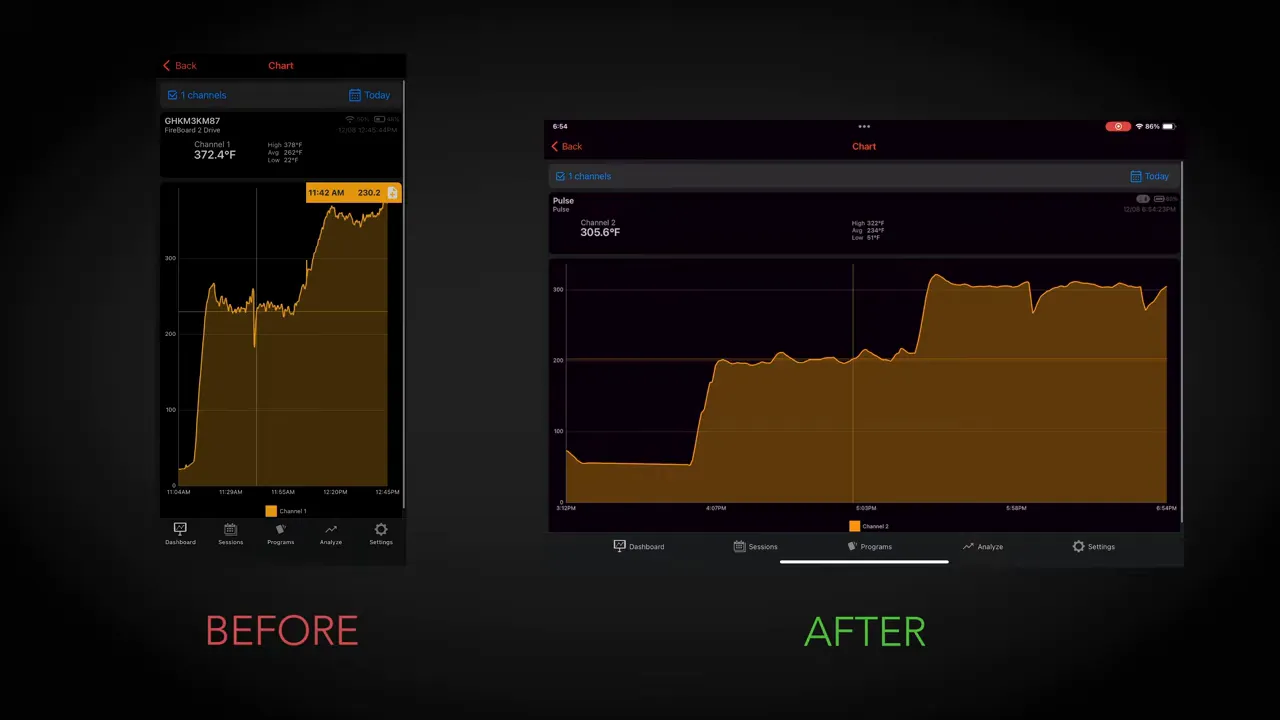
With the FireBoard installed, the problems I had seen with overshooting, undershooting, and recovery were addressed in this cook. As the session continued, the temperature trace became progressively flatter.
My impression was that the control system was settling into the cooker and conditions. I cannot establish exactly what the algorithm was doing internally from a chart, but I could see the steadier temperatures.
The small dips during the pork cook lined up with lid openings. I was occasionally spritzing the shoulder with a mixture of half apple cider vinegar and half water as I worked on the bark. Those interruptions were visible, but the cooker recovered rather than sending the session into another prolonged temperature roller coaster.
That distinction matters. Stable control does not mean the temperature never moves when you open the lid. It means the grill manages those disturbances much better.
A Few Useful Extras, and a Very Good Dinner
There is also a USB-C connection beneath the controller that I used to recharge the Pulse. By the time I checked it, the probe was nearly fully charged again. It can also be used to charge a smartphone.
Between that, the six wired probe ports, wireless probe integration, Wi-Fi, app control, and Drive Programs, the old Traeger had gained a much more modern set of controls.
And the pork? After the cook and rest, it was juicy, tender, and ready to pull apart. I used cotton gloves beneath nitrile gloves to reduce the heat reaching my hands while shredding, then added a little extra rub.
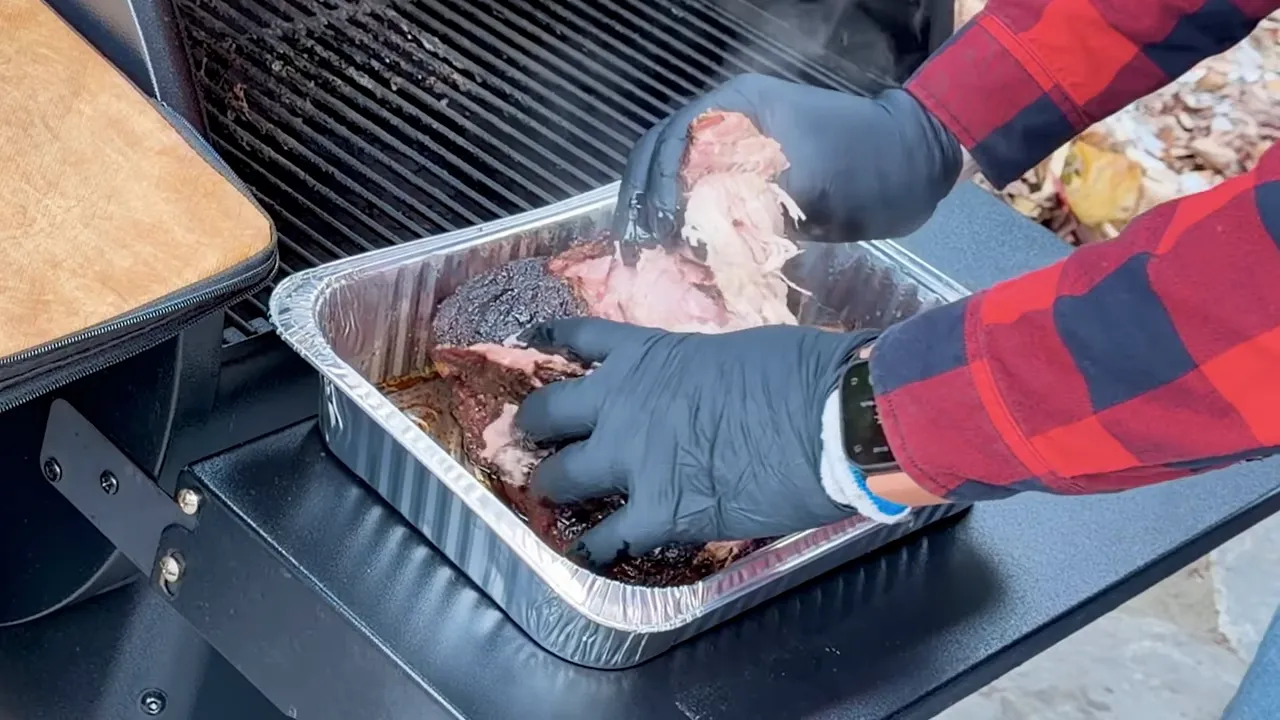
The taste test deserved a second bite. That is always a good sign.
Still, a tasty shoulder alone would not prove a controller upgrade worked. The more useful evidence was the combination of a successful cook, steadier recorded temperatures, better recovery, and an automatic program that did what I wanted.
My Verdict: Don’t Bin the Grill Just Yet
If you are frustrated enough with your pellet grill to think about replacing it, the problem may be its aging controller rather than the cooker itself.
On my Traeger Pro 22, this prototype FireBoard Drive Pellet Controller made the experience substantially better. Installation was straightforward, temperature control improved, and the connected features made the grill more capable without replacing its cooking hardware.
I’m giving the experience two thumbs up. The remaining question is value: final pricing and product details were not available during my test, so I cannot put an exact savings figure on the upgrade or assume this installation applies to every pellet grill.
But the central idea absolutely earned its keep. A new brain gave this older grill a new lease on life. Don’t be afraid to fire it up.
|


